Product Customizer for Engraving Businesses
Sigmira is the product customizer for engraving businesses: customers see exactly how their text, monograms, and artwork will look on the finished piece before you ever fire up a laser.
Built for the engraving industry
Precise design placement
Customers position text, logos, and artwork on an accurate product mockup so every element lands exactly where it should. No more back-and-forth emails.
Material-specific templates
Offer pre-built templates for wood, acrylic, glass, metal, and leather. Each template carries the correct dimensions, safe zones, and design constraints for that material.
Laser-ready file export
Export customer designs as high-resolution PNG, JPG or PDF files at the exact DPI your laser cutter or CNC machine requires, without converting anything by hand.
Let your customers preview how their engraving will look
Turn on engraving previews and customers see their photo or text the way your laser will actually burn it, on the material they picked. They approve exactly what comes off the machine, before they pay.
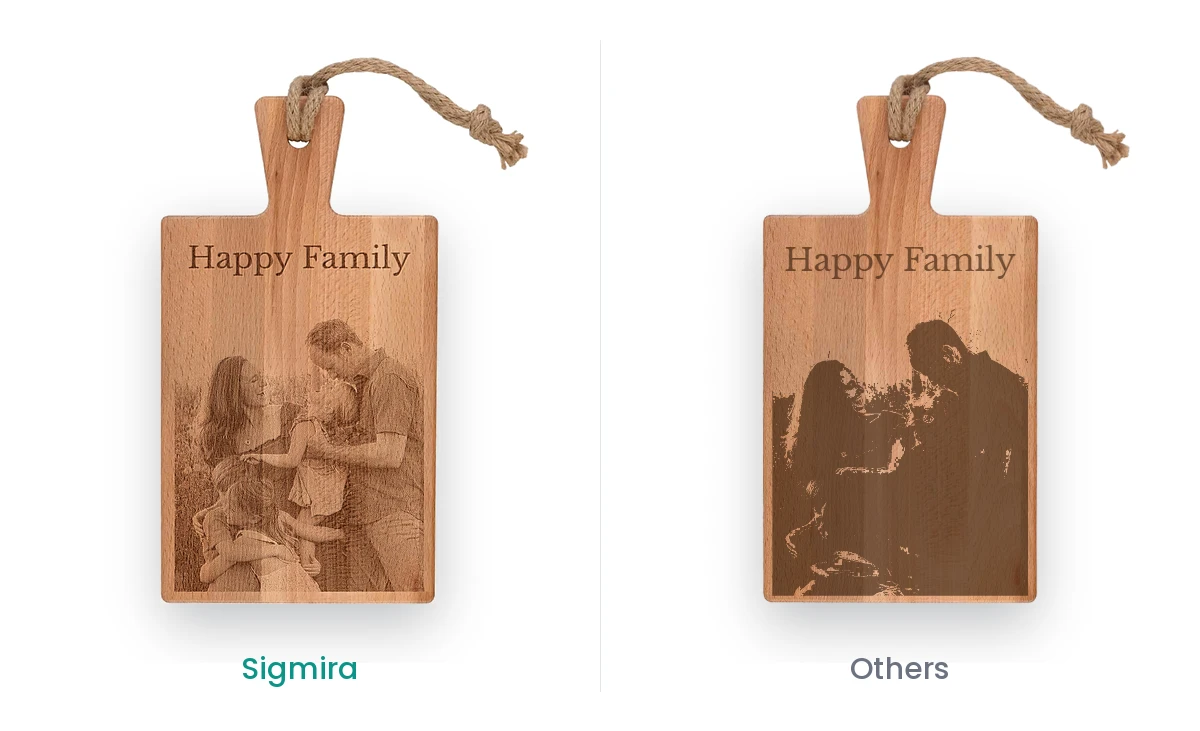
Pick the render mode that fits the job
- Dither
- Dot patterns that keep photo detail, the way most photo engraving runs.
- Threshold
- Crisp black and white for text, logos and line art.
- Grayscale
- Smooth tonal depth for machines that vary power per pixel.
Select from a variety of materials
- Wood
- Glass
- Acrylic
- Stone
- Ceramic
- Leather
- Metal
Your production files stay untouched
The preview is for the shopper only. You still download the same print-ready file with every order and engrave it in LightBurn, EZCAD, RDWorks or whatever software your machine runs.
Everything you need in one plugin
The same powerful feature set in every Sigmira plan, tailored to your workflow.
Drag-and-drop designer
Give your shoppers a real-time product customizer on your product pages. Let them add text, upload high-res images or start from pre-made templates, and watch an instant, pixel-perfect preview as they go.
Multi-view product designs
Give your customers the freedom to be creative across multiple angles. For instance the front and back of a T-shirt. Each view is isolated, with its own print layers and design controls.
Smart pricing engine
Set pricing options that fit your way of working: per text, per character, per view, even per mm². Customers watch a live cost preview while they design, so the price at checkout never surprises them.
Production-ready files
No more manual file preparation. Sigmira renders every design server-side and produces high-DPI PNG, JPG and production-ready PDF files the moment an order is placed.
Dropbox integration
Let your production-ready export files land in Dropbox directly, without the need of downloading any files manually. Build custom automations with our ready to use webhooks for a more highly efficient workflow.
Built for mobile
Over half of your customers shop on their phones, so the editor is built for touch first: pinch-to-zoom, drag handles, controls that fit under a thumb. On desktop it looks just as beautiful.
Useful guides to get you started
Straight from the Sigmira docs: the setup steps that matter most for engraving stores.
Download print-ready files
Where the production file lives on each order and how to pull it.
Read the guideExport formats
The formats and DPI settings Sigmira renders for production.
Read the guideAdd your print area
Set the engravable zone with exact dimensions in millimeters or inches.
Read the guideText & fonts
Curate the font list so customers only pick faces your engraver handles well.
Read the guideFrequently asked questions
Common questions about using Sigmira for engraving.
Can Sigmira export vector files for laser cutters?
Yes. PDF exports keep text and other vector elements as true vector paths, so you can import them into LightBurn, EZCAD or RDWorks and cut, score or engrave along the lines. Photos and other uploaded images stay as images inside the PDF; they are not converted to vectors. For raster engraving, PNG and JPG exports are available at up to 1200 DPI.
How do I restrict designs to my engraving area?
Each product in Sigmira has configurable print areas with pixel-accurate boundaries. You set the engravable zone dimensions in inches or millimeters, and the editor warns customers when they place elements outside that region.
Does it work for rotary engraving on curved surfaces?
Sigmira supports flat-projection design areas that map to curved surfaces. You define the unwrapped dimensions of your rotary fixture, and customers design on a flat canvas that wraps correctly when engraved on rings, bottles, or cylindrical items.
Can I limit which fonts customers use?
Yes. You control the font library: upload only the fonts your engraver supports, and customers choose from that curated list. This prevents orders with fonts that render poorly at small engraving sizes.